In this post, we are going to talk about word embedding (or word vector), which is how we represent words in NLP. Word embedding is used in many higher-level applications such as sentiment analysis, Q&A, etc. Let's have a look at the most currently widely used models.
[0, 0, ... 1, .., 0]
This is usually used as the input of a word2vec model. It is just operating as a lookup table.
So this one-hot encoding treats words as independent units. In fact, we want to find the "similarity" between words for many other higher-level tasks such as document classification, Q&A, etc.
The idea is: To capture the meaning of a word, we look at the words that frequently appear close-by this word. Let's have a look at some state-of-the-art architectures that give us the results of word vectors.
The intuition behind this model is to predict the "context" words given the "center" word.
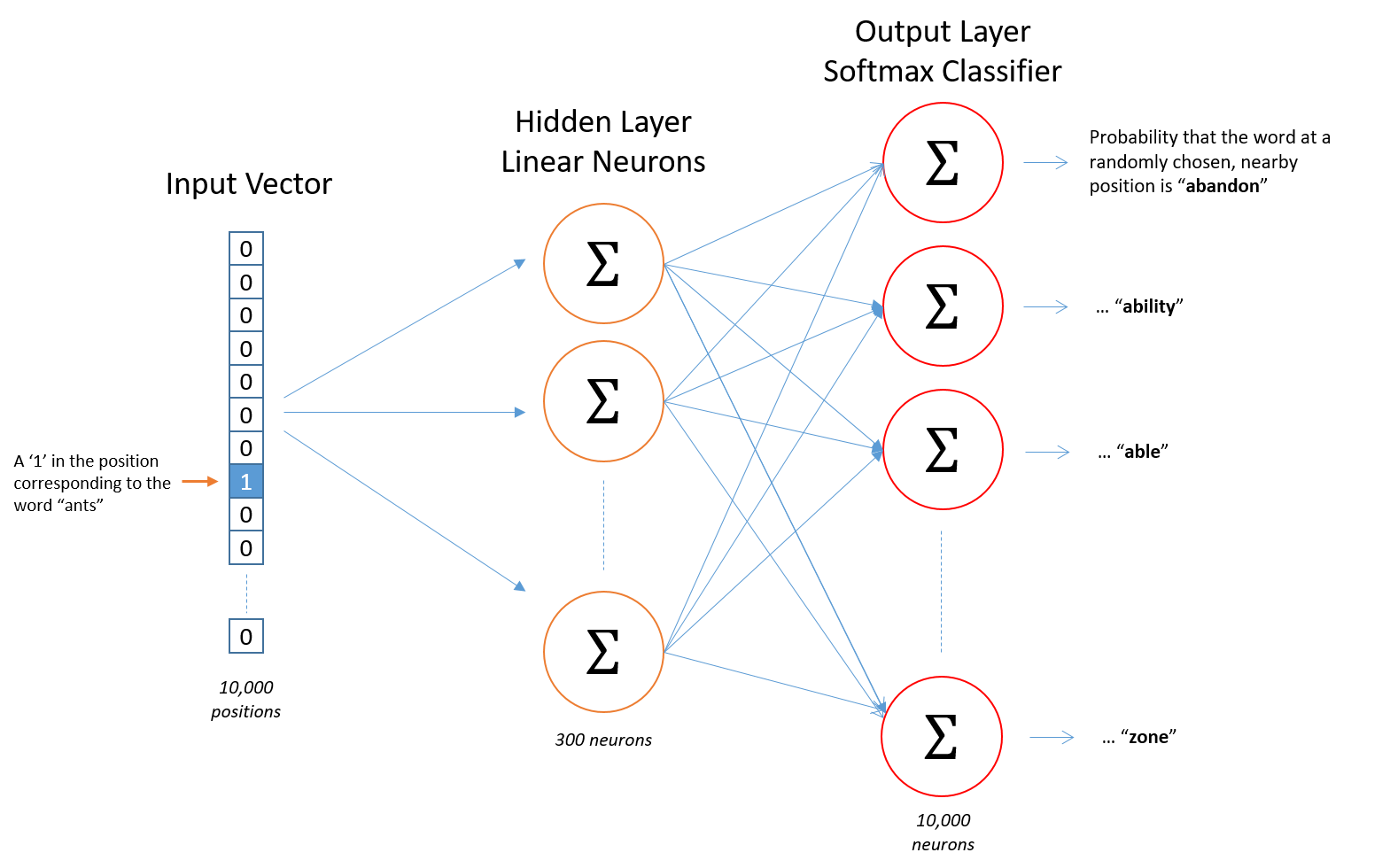
Given a center word, we want to tell what the probability of another word appearing in its context is. In order to do that, we can use an architecture as illustrated in the picture.
A more details about this model can be found here.

The model is pretty fast training, scalable to huge corpora and has good performance even with small corpus, and small vectors.
One-hot vector
is a vector of size V, with V is the vocabulary size. It has value 1 in one position (represents the value of this word "appears") and 0 in all other positions.[0, 0, ... 1, .., 0]
This is usually used as the input of a word2vec model. It is just operating as a lookup table.
So this one-hot encoding treats words as independent units. In fact, we want to find the "similarity" between words for many other higher-level tasks such as document classification, Q&A, etc.
The idea is: To capture the meaning of a word, we look at the words that frequently appear close-by this word. Let's have a look at some state-of-the-art architectures that give us the results of word vectors.
The Skip-gram model
 |
| http://mccormickml.com/2016/04/19/word2vec-tutorial-the-skip-gram-model/ |
The intuition behind this model is to predict the "context" words given the "center" word.
Given a center word, we want to tell what the probability of another word appearing in its context is. In order to do that, we can use an architecture as illustrated in the picture.
- Input: One-hot vector, with the size = the size of the whole vocabulary
- Training examples: word pairs (words that appear together in a window with a certain size)
- Output: Vector representation of each word, or more specific in the testing phase, given an input word, the output is a probability vector (how likely each word to be the context word of the given input word is).
Now let's have a look at the architecture:
- The hidden layer: Let's say we want to learn a word vector with 500 features (e.g., 500 dimensions), our vocabulary size is 10K. Then the hidden layer is going to be represented by a matrix of size (10K, 500).
- The output layer (softmax classifier): The output layer is a softmax regression classifier, which gives output between 0 and 1. So each given word, it will output a vector size 500 to represent this word.
The CBOW (Continuous Bag of Words) model
Its architecture is very similar to the skip-gram model, except for the fact that, in skip-gram, we predict context based on center words, while CBOW predicts a "center" word given a bag of "context" words.GloVe model
This model combines traditional count-based model with direct prediction models as we have been above (Skip-gram and CBOW). This is one of the most popular model that is currently used nowadays.The model is pretty fast training, scalable to huge corpora and has good performance even with small corpus, and small vectors.
Comments
Post a Comment